The invoice reconciliation is a process of confirming and matching every piece of information in invoices. The process includes sorting each and every invoice to match with corresponding bank statements, so each account can be balanced.
In accounting terms, reconciliation means using more than one record to make sure that all figures are identical and are in agreement with each other. It can also mean that the organization is trying to confirm each account payable and the invoices within a given period, to reach a balance.
Reconciliation ensures that financial records are accurate and reliable, which is why it is essential to understand the difference between invoicing and reconciliation to maintain clarity in financial processes and avoid discrepancies.
What You'll Learn
- 01The key differences between invoicing and reconciliation processes
- 02Why regular invoice reconciliation is essential for fraud prevention
- 03Step-by-step guide to reconciling invoices accurately
- 04How automated reconciliation compares to manual methods
- 05Best practices and tools to simplify your reconciliation workflow
Difference Between Invoicing and Reconciliation
Invoicing and reconciliation are essential processes in financial management, but they serve different purposes. Here are the following:
Invoicing vs. Reconciliation
| Aspect | Invoicing | Reconciliation |
|---|---|---|
| Definition | Process of curating a detailed bill for line items, products, and services sold or offered | Procedure of comparing more than one record to ensure the money received is balanced with money spent and that the accounts are matching after comparing them to prevent check fraud |
| Purpose | To request payment from a client | To verify that payments and financial statements align |
| Frequency | Whenever a transaction is completed | Performed regularly, often monthly or quarterly |
| Example | Sending an invoice for $1,000 to a client after completing a project | Comparing the $1,000 payment receipt to the bank statement for accuracy |
Why You Should Have Invoice Reconciliation?
Performing invoice reconciliation is mandatory for businesses regularly. This is the best suitable way for accountants to examine specific accounting records and bank statements. Based on their findings they need to update the status of invoice amount and transactions made for that particular period. The reconciliation procedure will help you up-to-date your bank statement and account operations so that you can keep track of each and every transaction on a regular basis.
How To Reconcile An Invoice?
Reconciliation of invoices is essential and needed for the sake of running the organization smoothly. It also helps the business owner keep tabs on fraud detections.
Fraud prevention is equally important as running a business. In other words, you need to be very careful when it comes to hard-earned money.
Step-by-step guide to invoice reconciliation
Here's a detailed guide that'll further help you create a well-structured invoice reconciliation:
- Step 1: Gather the necessary documents
Collect all relevant documents, such as purchase orders, invoices, receipts, and payment records. Ensure every document is complete and legible for seamless reconciliation.
- Step 2: Use an invoice reconciliation tool
Leverage accounting software or reconciliation tools to automate the process. These tools help you identify mismatches efficiently and save time.
- Step 3: Verify invoice details
Check the accuracy of critical details, such as invoice number, date, itemized charges, and tax calculations. Look for discrepancies in amounts, descriptions, or unauthorized charges.
- Step 4: Match payments and invoices
Compare payment records with the invoices to ensure all payments align with issued invoices. Mark discrepancies for further investigation and resolve them with clients or vendors promptly.
Matching the exact figures stated in spreadsheets and accounts to the invoices outside and the ones received, and also to know the buyer who hasn't paid and payments to be made are the reasons for reconciliation.
Here are super important tips that will help you reconcile invoices.
Use invoicing solution
An invoicing solution will make the data simplified with less time to execute the task. Some business owners are always tied up with activities and may not focus on balancing figures and matching accounts. An online invoicing solution will help you reconcile your invoices within a given period you input into the system.
Find the right process
Accounting software will bear the strain during the invoice reconciliation process, but you have to organize the administrative procedure. Firstly, sort each and every invoice by month so that reports can be run to reflect each outstanding payment; this will provide you with a simple procedure.
Vendors often have their methods of naming and sorting invoices. Vendors make sure you can access invoice numbers, reference numbers, date of the amount due, alongside other data like accurate timing that results in getting organized the procedure.
Create a checklist
Prepare a checklist to help you through the procedure of reconciliation; it helps if you're dealing with large figures.
Checklist components
Your checklist should be based on aspect like:
- Did any bank or financial institution charge you?
- Was there a time you issued a discount for early payment?
- Did the supplier charge you more than the actual price or less?
- Are you paying the overdue balance later?
- Was an amount rolled over without you noticing it?
Manual vs. Automated Invoice Reconciliation
In the past, businesses used to do manual billing reconciliation by going through the document by document, line by line. Attempting to reconcile each and every statement and a bank statement manually must be a time-consuming task for most businesses.
That is the reason, modern companies moved to automated processes to achieve their goal.
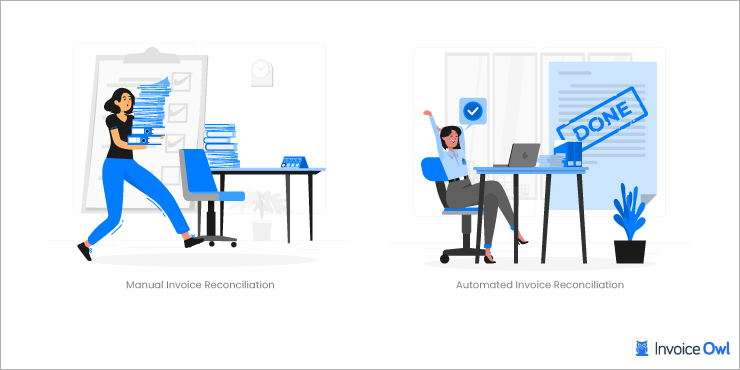
Pros and cons: Manual vs. automated reconciliation
Here is the below comparison in detail:
Manual vs. Automated Reconciliation
| Aspect | Manual Reconciliation | Automated Reconciliation |
|---|---|---|
| Time Efficiency | Time-intensive and slow | Fast and efficient |
| Error Risk | High risk of human error | Minimal errors with system accuracy |
| Cost | Low initial cost but high long-term labor costs | Higher upfront cost but lower long-term costs |
| Scalability | Difficult to scale for large volumes | Easily scalable with increased transactions |
| Actionable Insights | Requires manual identification of issues | Automatically highlights discrepancies and matches |
| Real-Time Tracking | Not feasible | Real-time tracking and adjustments are possible |
| Training Required | Minimal training required | Requires onboarding and technical understanding |
The system also matches purchase orders with the balance sheet, bank account, supplier invoices, vendor invoices, vendor records, payments, payment discounts, remaining amount, list of goods and services, profit and loss statement, and the other invoice processing.
Simplify Invoice Reconciliation
Managing business finances is definitely a tough job for you along with the other business tasks. So, you should focus on simplifying the invoice/statement reconciliation by using payment systems to automate and organize reconciling invoices and records. You will also be able to track the professional invoices and make any changes if needed.
Best practices
To ensure a smoother process and keep your finances on track some considerable practices can help you indefinitely. Let's quickly go through them all:
Tools and technologies
By using invoicing software, you will be able to simplify the payment processes along with the invoice status, which will impact your revenue. The best way to simplify the invoice procedure is to use the right tool that allows you to perform all the tasks on your behalf of you without creating a hassle for you.
You can follow the most basic rules for simplifying the procedure or you can choose to have a complicated set of rules, it completely depends on you and your team members' ability.
Important Suggestions for Invoice Reconciliation
Every business has its own way of dealing with its finances and accounting. To make their workload easy they try to search for quick ways of dealing with the financial records that help them identify the mistakes they should avoid.
Common challenges and solutions
There are plenty of challenging things you need to keep in mind while doing invoice reconciliation. The first thing is that you need to make sure you are filing your invoices by using a deposit dates format and make entries as soon as you receive the payment. Put all the documents in chronological order, so it will be easier for you to keep track of the data. Then when you perform invoice reconciliation processes, you can skip the lengthy steps.
Many business owners miss making entries when they receive payment for their goods or services and then they won't be able to find out the missing entries at the time of the audit. Make a habit of reconciling invoices as soon as the shipments depart and receive to ensure you're not overpaying vendors or running low on inventory.
Tips for improving efficiency
Make sure you are making entries as soon as you receive any kind of payment for the goods and services or items you sold to your clients. You should make a habit of reconciling invoices as soon as the shipments depart and receive and make sure you are not overpaying the vendor or the inventory is not empty. These little suggestions will help you with up-to-date transaction information between you and your clients, so both of you will have entries to cross-check the data.
Simplify Your Financial Management
Say goodbye to manual errors and endless paperwork. Automate your reconciliations and keep your accounts accurate with InvoiceOwl.
Get Started NowFrequently Asked Questions
Automation can enhance efficiency by quickly identifying mismatches, reducing human error, and allowing for real-time tracking of transactions.
An invoicing solution streamlines data management and reduces the time required for reconciliation tasks, making it easier to match invoices with payments.
Businesses should conduct invoice reconciliation regularly, often monthly or quarterly, depending on the business needs. This helps to maintain accurate financial records and ensure timely detection of errors.
Yes, while invoice reconciliation can be done manually using spreadsheets or paper records, specialized software like InvoiceOwl can significantly enhance accuracy and efficiency in the process.
Conclusion
With that being said, we can easily determine the importance of reconciliation of invoices. This practice helps businesses to keep the financial records in check. Traditional methods are still the first option for many business owners.
However, with the latest advancements, tools like InvoiceOwl have made it relatively easy to reconcile the invoices. All you have to do is to choose the right and most suitable method depending on your business requirements. You must choose the one that helps you save your team's valuable time and effort.