Being a sole trader, what's your main goal? - To represent and maintain all the business transactions accurately. But, how is it to be done? A sole trader invoice helps you do that. Generally, you must include the list of service offerings, pricing, and preferred payment method in this invoice. This article covers the essential aspects that help you in creating a sole trader invoice from scratch.
What You'll Learn
- 01Why sole traders need professional invoices to maintain business transactions
- 02Essential information to include in a sole trader invoice
- 03Step-by-step process to prepare invoices using templates
- 04Helpful tips for efficient sole trader invoicing
- 05Bank details and payment methods to include for faster payments
Why Sole Traders Need Professional Invoices?
The requirement lists changes as per the client's expectations. And as a sole trader, it becomes of prime importance for you to deal with the customers' demands and it is made possible by creating and sending professional invoices to your customers. The sole trader's invoices must be flexible enough and easy to read for the customers. It means that the customers can easily understand what they are being charged for. The sole traders just need to outline the work done and the amount charged to make it easy to use for their customers.
What To Include in a Sole Trader Invoice?
The primary job of a sole trader is not just to enter the essential work details and price list in the invoice. But, a sole trader must create invoices efficiently to avoid any flaws that exist between both the parties and authorize the business transaction. All the necessary information to include in the free invoice are:
How to Prepare a Sole Trader Invoice?
If you're sending an invoice for the first time or you've been doing so regularly, you need to learn how to prepare an invoice using templates. You can select a template for a billing invoice or create a new invoice template in formats like Word, Excel, and even PDF using an invoicing software solution to get paid quickly. When you create invoice templates, you need to follow specific rules that indicate what information needs to be included in an invoice template. The guideline is essential for formatting an invoice template, which is less restrictive. An ideal way to format invoice templates is to think about your invoice template as it contains four parts that include certain kinds of information.
Invoice Template Structure
| Section | Description | What to Include |
|---|---|---|
| The Header | Business and client information | Business name, address, contact details, client's company name, address, and contact details |
| Top right or left | Invoice-specific details | The word 'Invoice', invoice number, date of issue, and due date |
| Body | Product or service information | List of products/services, price per item, quantity, product number, total amount, applicable taxes |
| The Footer | Payment information | Payment terms and conditions, payment methods, bank details, and thank you note |
Now, let's highlight the steps that you can use to prepare a sole trader invoice:
- Create a blank page in Microsoft Word.
- First, create a header to include your business name and contact details.
- Provide your customer's name just below the header and make sure it is left-aligned.
- Assign an invoice number and date of billing. The invoice number helps with reference and bookkeeping purposes.
- Include the product you supplied or the type of service you rendered with the right description and price. The price of each service or product should be at the end of each description.
- At the end of all descriptions and price tags, calculate the total amount you're going to be paid and write it down, with tax rates and other discussed fees.
Add all necessary payment details and terms as well as your preferred payment methods.
Create Professional Invoices Online Easily and Keep On Top of Your Finances
InvoiceOwl is a feature-rich invoicing app that helps small businesses, freelancers and contractors to create invoices on-the-go and get paid quicker!
Start Your FREE TrialHelpful Tips For Sole Trader Invoicing
Below are the tips that will be helpful to you for creating invoices.
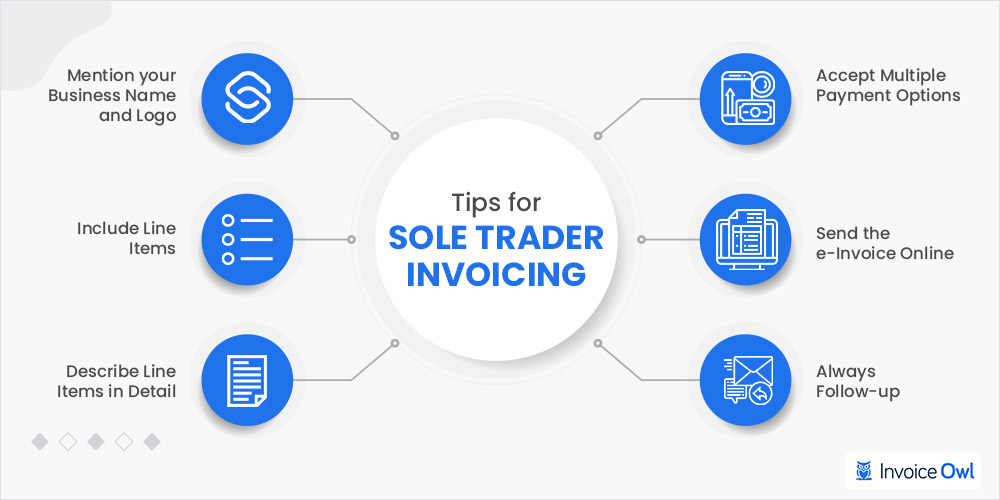
Follow these practical tips to ensure your invoices are professional, clear, and effective in getting you paid on time.
- Create an invoice by mentioning your business name with a logo clearly.
- Include all the essential products and service offerings along with the charges you're providing to the customers.
- You must mention the service description in detail, making it easy for the customers to read and verify it. If it is a product, describe it and add the quantity you supplied.
- Include the different payment options in the invoice which makes it easy for the customers to pay an invoice on time.
- You help your business send invoices with automated systems or via electronic mail so that you and the customer will have an original copy of the invoice.
- Have a follow-up plan, always remind the customer to make payment when the payment is overdue.
Bank Details That Should be Added to An Invoice
An essential metric to include in a sole trader invoicing is selecting the preferred payment methods for transferring money directly from the bank account. So, you need to include the following bank details in your invoice: One of the preferred payment methods is bank transfers; if you want to get paid through bank transfers, you'll need these details on your invoice.
After including these details, you can add your payment terms clearly to get paid. After that, have all the necessary information and terms and conditions, endeavor to add a note, and appreciate your customer for doing business with you. Afterward, you can introduce them to other services you offer. Showing appreciation to customers will help you maintain the customer relationship and also get them to pay you faster.
Frequently Asked Questions
A sole trader invoice is a billing document issued by a self-employed individual or sole proprietor to request payment for products or services provided. It includes essential business and customer details, service descriptions, pricing, and payment terms to ensure accurate business transaction records.
Yes, sole traders should include their registered business number on invoices. This helps maintain professional standards and ensures compliance with tax regulations. It also makes it easier for clients to verify your business legitimacy.
Sole traders should offer multiple payment options to make it convenient for customers to pay. Common methods include bank transfers, credit/debit cards, online payment platforms, and cash. Including diverse payment options typically results in faster payment processing.
Invoice numbers should follow a sequential and consistent format for easy reference and bookkeeping. A simple approach is to use a prefix followed by sequential numbers (e.g., INV-001, INV-002) or include the year (e.g., 2024-001). This system helps track invoices chronologically and prevents duplicates.
Yes, invoicing software is highly recommended for sole traders. It automates invoice creation, tracks payments, sends reminders for overdue invoices, and maintains organized records. Software solutions like InvoiceOwl save time and reduce errors compared to manual invoice preparation.
Have a follow-up plan in place. Send a polite payment reminder shortly after the due date, followed by more formal reminders if needed. Automated invoicing software can handle these reminders automatically. Consider including late payment fees in your terms and conditions, and always maintain professional communication.