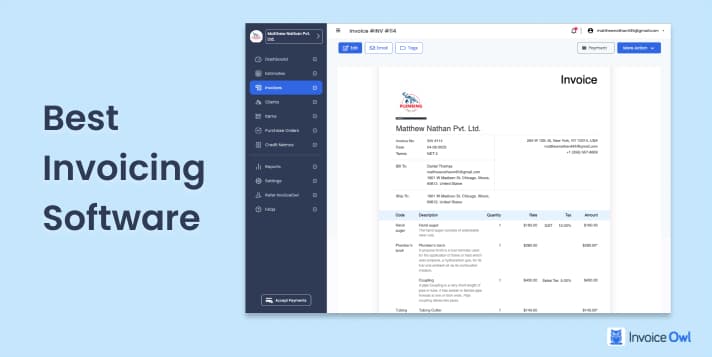
The best invoicing software offers a range of essential functions, from creating professional invoices to managing payments and cash flow. It can also handle upfront deposits and approve quotations instantly. These tools simplify processes, reduce errors, and minimize payment delays.
But how do you choose the right one for your business? To help you decide, we've compiled a list of the best invoicing software for small business owners and contractors, complete with features, benefits, drawbacks, and user reviews.
What You'll Learn
- 01Compare 10 leading invoicing platforms for contractors
- 02Key features: e-signatures, mobile invoicing, payment tracking
- 03Pricing ranges from free to $30/month
- 04Real user reviews and testimonials
- 05Which software works best for your business type
Top 10 Invoicing Software Comparisons
Choosing the best invoicing software can be a challenge, especially when searching for the right contractor invoice software or invoice software for Mac to meet your unique business needs. While no single solution fits every requirement, selecting invoicing software that aligns with your business goals is essential for efficiency and growth.
Below we have carefully crafted a list that can help you determine the best invoicing software for your business.
Quick Comparison
| # | Software | Price | Rating | Best For |
|---|---|---|---|---|
| 1 | InvoiceOwl | $9.99/mo | 4.5 | Contractors & field service |
| 2 | QuickBooks | $30/mo | 4.0 | Full accounting needs |
| 3 | Zoho Invoice | Free | 4.5 | Budget-conscious businesses |
| 4 | Square Invoices | Free | 4.1 | Retail & service businesses |
| 5 | SimplyBill | $5/mo | 4.0 | Basic invoicing only |
| 6 | Invoice2go | $5.99/mo | 4.3 | Mobile-first users |
| 7 | Scoro | $26/mo | 3.9 | Project management + invoicing |
| 8 | FreshBooks | $13.60/mo | 4.1 | Freelancers & consultants |
| 9 | Harvest | $30/mo | 4.3 | Time-based billing |
| 10 | Hiveage | $14/mo | 4.5 | Small teams & agencies |
Jump to Software
InvoiceOwl
InvoiceOwl
Best Free Invoicing Software for Contractors

InvoiceOwl is an efficient contractor invoicing software that simplifies the workload of users by generating accurate estimates and invoices in no time. It assists users in going completely paperless and creating 100% error-free documents. From creating bids to receiving payments, InvoiceOwl covers the entire spectrum of invoicing needs.
During the 3-day free trial period, users can gain a comprehensive overview of how InvoiceOwl effortlessly streamlines invoicing workflows. Additionally, two different pricing plans are available, offering a range of features and an enticing discount offer.
Key integrations and capabilities:
- Digitally sign the estimates and invoices for more convenience
- Get immediate customer feedback by requesting reviews immediately after delivering services
- For recurring billing, seamlessly store and manage your client details to eliminate the hassle of entering them repeatedly
- Simplify order supply using InvoiceOwl's instant purchase order generator
- Get real-time notifications for your invoices and payments. This can free you up from the tedious tasks of continuous follow-ups to chase payment
- Generate online sales reports on the go and derive useful business insights from them
- Simplify your bookkeeping processes by syncing your InvoiceOwl account with QuickBooks Online
InvoiceOwl is a game-changer for my business. I can effortlessly create estimates on-the-go and convert them to invoices. The eSign feature and online payments are seamless.
QuickBooks
QuickBooks
Online Invoicing and Accounting Software

QuickBooks is the simplest way to manage accounts online. It has features like expense tracking, invoicing, and seamless integration with banks for running reports and gaining deep business insights. It is one of the renowned names in the realm of accounting and finance software. It offers a comprehensive suite of tools designed to simplify financial management for businesses of all sizes.
You can seamlessly manage all your tasks, maintain client details in real time, and perform all your accounting practices, all within a single account. Not just this, you can even supercharge your current workflows by the integration of third-party optional apps in QuickBooks.
Track GST and VAT with ease using the built-in tax tracking features.
- Extensive help library, how-to videos, and exceptional customer support
- Can be accessed from anywhere and from any device
- Well-suitable for managing multi-accounting scenarios
- Track expenses through receipt scanning and auto-linking with bank transactions
- Initial use can be frustrating and challenging to navigate
- Pricing structure may be a setback for small businesses or startups
- Some essential features locked behind higher-tier plans
For those facing challenges with QuickBooks, exploring an online QuickBooks alternative could offer a more budget-friendly and user-friendly solution while still providing essential business features.
Can track everything I have, from my revenue, costs, as well as monthly expenses all in one place. I can easily find the areas to maximize profits.
Poor customer support and unilateral price increases make it a way less affordable option. Do look at alternatives if the subscription cost is key for you.
Zoho Invoice
Zoho Invoice
Best Free Invoice Creating Software

Zoho Invoice is a free cloud-based invoicing software. It helps you to create and send professional invoices, automate payment reminders, and accept payments online. It is basically an invoice maker software, that not only allows you to create invoices but also makes monitoring and managing invoices easy.
Using Zoho's pre-designed templates you have the ability to personalize and brand your invoices the way you want. Besides invoicing, time tracking to bill clients on an hourly basis, expense tracking as well as automated reminders, branded client portal, and report generation are also provided by Zoho.
- Entirely a free invoicing software - only pay for specific features or add-ons
- Extensive customization features available to personalize invoicing
- Simple and intuitive user interface for smooth navigation
- Automatically converts estimates into invoices
- Limit of 1,000 invoices per year on free plan
- Advanced features only available in paid version
- Reporting tool is quite difficult to use
It was easy to set up a company account, clients, projects, and invoice fields.
Square Invoices
Square Invoices
Free Billing Software for Freelancers & Small Scale Enterprises

Square Invoices is a free billing and invoicing software, designed specifically for businesses that value simplicity, efficiency and prompt payments. The software works entirely in favor of users to win more work. For instance, it smoothly manages finances, get better customization, and can maintain a healthy client relationship.
Custom layouts, batch invoicing, multi-package estimates, project workspace, and dashboard, all in combination work to elevate user's business operations to new heights.
- Professional-looking invoices without extensive customization needed
- Work on invoices from any device connected to Square account
- Two-factor authentication ensures utmost security
- Easily embed work-related details, images, and signed documents
- Core features like contract generation and additional invoice fields are absent
- Payment collection restricted to users' home country only
- Invoices sent via emails may end up in recipients' junk folders
The dashboard is clean, easy to use & allows for lots of customizations. Invoices allow for reminders, text & email messages.
I dislike the length of time it takes for the invoice to capture ACH payments.
SimplyBill
SimplyBill
Cloud-based Contract Billing Software

SimplyBill is an intuitive cloud-based invoicing software. It provides a simple solution to create customized estimates and invoices online with the flexibility to save them in PDF file format and send them directly to clients via email. You are even offered instant payment reminders and the flexibility to send automated thank you messages once payment is done.
However, many core features streamlining users's invoicing processes are lacking here when compared to other existing competitors in the market. For instance, multi-company management, online syncing with Quickbooks, receipt-making tools, multi-currency options, report generation, etc.
- Cloud-based software - no installation needed on your device
- Can let users see the monthly totals of the previous year
- Can easily track payments and sales tax of the invoices
- Lacks comprehensive support for accepting various payment gateways
- Mobile edition could be more responsive and speedy
Can easily let you check the status of whether invoices paid or outstanding.
Not meant for businesses that require features other than simply invoicing.
Invoice2go
Invoice2go
Invoicing System for Contractors

Invoice2go is an ideal feature-rich invoicing software for construction. With multiple features listed above, free accounting tools are also available that ease out the invoicing workflows of the users. However, the pricing tiers against the bundle of feature options provided, are something that makes you think twice before investing.
For instance, with the starter plan, you simply get to create only two invoices per month, followed by five under a professional plan. On the contrary, contractor billing software like InvoiceOwl offers the flexibility to create and send unlimited invoices at lower rates than what is charged by the premium plan of Invoice2go.
- Seamless experience with user-friendly interface and comprehensive features
- Range of customization over templates to match company identity
- Payments through PayPal and ApplePay in addition to credit cards
- Intuitive reporting system allows downloading reports anytime
- Cannot export yearly sales report
- Occasional difficulties at time of onboarding
- Previous year's mass data cannot be deleted at once
- Lacks feature to track whether clients have viewed invoices
It's easy to use, intuitive user interface & works great on mobile devices. It clearly shows all my invoices, paid and outstanding.
It does not notify clients when a payment is past due, so you have to manually send the notification to your client.
Scoro
Scoro
All-in-one Business Management Solution

Scoro works to simplify users' invoicing processes and effortlessly get an overview of the complete business finances. It is an all-in-one comprehensive invoicing solution that performs multiple tasks to ensure that a quote generated turns into an invoice and that invoice into a paid one. It tries to lessen human tasks by automatically sending the scheduled recurring invoices without manual intervention.
Not only this, it also helps with automatic payment reminders so that none of your invoices remains outstanding. Scoro is more than just an invoicing tool; From project inception to final invoicing, Scoro's all-encompassing platform simplifies the complexities of project management, time tracking, and financial operations.
- Unified platform catering to all accounting and management requirements
- Easy to navigate during trial phase, quick to learn
- Higher pricing tiers with hidden costs
- QuickBooks integration not smooth
Great invoicing and reminders system.
Not worth paying for a subscription. The platform keeps deleting/removing my routes. Only allowed a certain number of stops despite paying for full membership.
FreshBooks
FreshBooks
Invoicing Software for Sole Proprietors & Freelancers

FreshBooks is a cloud-based and easy-to-use accounting and invoicing option. This construction invoice software has a user-friendly interface and multiple time-saving automation features.
Three different pricing tiers are made available by the software offering multiple features but restricted by the no of clients that can be added. For instance, under the Lite plan, you can add only 5 clients followed by 50 under the Plus plan. This might not be sufficient for a company having a large client base as they have to compulsorily upgrade to the higher pricing plans.
- Visually appealing and intuitive interface with easy navigation
- Free seamless tax calculation feature for accurate taxation
- Real human support available - no need to search through articles
- Automate and schedule recurring invoices to save time
- Mandatory switch to new version left some users disappointed
- Automatic saving functionality is lacking
- Users from non-accounting field might feel complexity during setup
- Limited subscription levels pose challenges for varying transaction volumes
For these reasons, many users are exploring FreshBooks competitors that offer more flexibility and user-friendly features.
It helps me to stay organized while I am working, I can time track all of my different clients in one convenient space and send them invoices from the same area.
The software has lots of bugs and the accounting execution is poor.
Harvest
Harvest
Cloud-Based Project Management Software

Harvest is one of the most efficient time-tracking and billing software for all your projects. However, with all the technological advancements, it is not more than just time-tracking software. It helps their customer to get seamless estimating and invoicing operations with instant report generation and multiple third-party integrations.
It is basically tailored for the service-based businesses that rely majorly billing clients based on hours worked. This time tracking and invoicing software excels in simplifying the intricacies of tracking billable hours, managing expenses, and tracking the cost incurred, generating accurate invoices, and getting paid online via PayPal and Stripe.
- Intuitive and straightforward user interface with easy invoice creation
- Charge tracked billable hours in automated professional invoice creation
- Easily record expenses and attach receipts for transparent billing
- Supports multiple currencies for billing clients globally
- Limited phone support - scheduled appointments may not align with urgent needs
- More customization options for expenses should be available
Simple and easy to use. I love that you can set a time limit on specific projects and visually see how much you've gone over. Also, having the costs and percentages visible is helpful as well.
I wish the recurring and retainer invoices could be shared with QuickBooks for better cash flow planning.
Hiveage
Hiveage
Invoicing Solution for Beginners

Hiveage is an easy online invoicing solution for all self-employed people, small business owners as well as entrepreneurs. It basically helps you to get away from cumbersome accounting operations and provides an easy way to bill clients digitally and keep track of current and future revenues.
Along with all the features that an ideal invoicing software provides, it has fast and dedicated customer support, time-to-time security and backups of the client data, and easy accessibility of the client's Hiveage account from either web-based or mobile-based devices. For instance, it can be PC, Mac, iOS Android devices, etc.
- Ability to monitor who has viewed your invoices for transparency
- Quick and hassle-free setup process
- Mobile quoting and invoicing for flexibility
- Occasional email deliverability challenges with emails landing in spam
- Delayed customer service responses and platform glitches reported
- Setting up might be challenging for less tech-savvy users
This software makes sending estimates and invoices so easy. Customer service is quick and awesome too.
Accounting features are limited, so I recently switched over to something a bit more robust.
Improve Your Business Efficiency with the Best Invoicing Software
After going through the 10 best invoicing software with detailed descriptions and reviews of each of them, it is obvious that you might be at a pivotal juncture in your decision-making process. All these different invoicing solutions listed above work in their best possible manner to meet individual business needs and preferences.
However, selecting the one that best suits you and your requirements is a tough choice. Also, just reading about the software might not be enough. Practically trying and testing them will help you make a wise decision.
So without any further ado, let's start with InvoiceOwl's 3 days FREE trial period offer.
Your Business Deserves Better Tools
Don't let outdated systems hold you back. InvoiceOwl is built for modern businesses that value efficiency and professionalism. Build Your Success Today!
Start Your FREE TrialFrequently Asked Questions
Yes, considering the range of invoicing options it provides along with a user-friendly interface and multiple payment options, InvoiceOwl is the best free invoice app for contractors.
To get enrolled with Square Invoices, signing up under their first free plan you do not have to pay any setup or monthly fees. Instead, you have to make the payment every time you bill your customer. Moving ahead, Square Invoices offers a pricing plan that starts from $29 per month with additional processing fees starting from 2.9%. Processing fees will be applicable regardless of the plan you have. Free or paid.
Yes, with InvoiceOwl's free invoice templates, invoice customization is possible. You can even experiment with the range of color options provided and choose the one that matches your brand. Moreover, the invoicing templates are also available in different file formats. For instance, Google Docs, Google Sheets, Microsoft Word, PDF, etc.
InvoiceOwl offers multiple invoicing features, including unlimited invoicing, e-signatures, multi-company management, real-time updates, online invoice generation, reports and analytics, a mobile app for both iOS and Android devices, and more.
Invoice generators are simply web-based invoicing tools to create custom invoices online and send them directly to clients. Invoices can be downloaded usually in PDF file format. Multiple templates with a range of color options are available.
Yes, Invoice2go, one of the best invoice software for contractors has overall three pricing plans. Among them, the third premium plan is the most expensive one. It gives you access to unlimited invoices. This plan also lets you send recurring invoices and automatically charge repeat customers.
Yes, Square Invoices has the ability to set up recurring billing and create recurring invoices. It's easy to set up, and you can use it on all your devices.
Yes, InvoiceOwl offers a mobile invoicing solution to complement its web-based platform. In today's digital age, it's common for software services to provide mobile apps that allow users to access their tools and functionalities on the go.
Some of the most famous options for invoicing software include InvoiceOwl, QuickBooks Online, FreshBooks, and Zoho Invoice. These platforms are user-friendly, offer automation, and integrate with accounting tools.
Invoicing software helps in automating invoice creation, tracking payments, and sending reminders. It eliminates errors by generating invoices instantly and accurately calculating taxes. Some tools support payment gateways allowing clients to pay online quickly and safely.
Yes, platforms like QuickBooks and Zoho Invoice integrate with tax reporting tools. Thus, automatically calculates and tracks sales tax for IRS compliance as per the U.S. tax systems.
Most invoicing software utilizes advanced security measures like encryption, secure servers, and multi-factor authentication to safeguard their client data. Cloud-based invoicing tools usually comply with the global protection standards such as GDPR and CCPA. Regular updates in the software ensure that the sensitive information is safe from data breaches or accidental loss.