'Invoice' and 'bill' are the two most popular terms that always confuse businesses, customers, and accountants. However, there are many differences between both the commercial documents —invoices and bills.
In this blog, we have mentioned the key difference between the two words —bill and invoice. It will help you make your billing process smooth by understanding the different purposes of billing vs invoicing. Moreover, this will make you receive the payment easily from your clients. So, keep reading until the end of this blog.
Key Takeaways
- 01Learn the fundamental differences between invoicing and billing
- 02Understand when to use invoices versus bills for your business
- 03Discover essential invoice elements and best practices
- 04Explore digital tools and automation for efficient billing
- 05Master billing terminology and professional documentation
Understanding the Basics
Understanding invoicing and billing is essential in the U.S. business market because it directly impacts cash flow, legal compliance, and client relationships. Furthermore, timely and accurate invoices ensure businesses get paid on time, supporting steady cash flow and financial health.
What is invoicing?
The actual meaning of an invoice is the legal document/legal evidence issued by a business owner to its client that summarizes the goods or services along with the details of the total sum of money owed by the business owner.
An invoice serves as the professional request for the collection of money.
It is issued after completion of the service or a milestone of the service, or after the ordered product has been delivered.
In other words, an invoice lists down the goods or services sold to the customer and mentions the amount owed in the business transaction.
For example, the plumber you hired issues you invoice records for his/her services that you have to process and pay within a previously agreed time limit.
Essential invoice elements
The essential invoice elements are as follows:
- Business and client information: Add your business name, address, and contact details, as well as the client's name and address.
- Invoice number and date: A unique invoice number and the date the invoice was issued.
- Itemized list: Clearly describe products or services with quantities, unit prices, and total amounts.
- Payment terms and due date: Specify the payment terms, such as net 30, and exact due date.
- Total amount and taxes: Summarize the total amount due, and any applicable taxes.
Types of invoices
The types of invoices are described below:
- Standard invoice: Used for general one-time billing of goods or services.
- Recurring invoice: Issued regularly for ongoing services like subscriptions.
- Pro Forma invoice: A preliminary invoice sent before goods or services are delivered.
- Final invoice: A summary invoice issued at the end of a project or service.
- Past due invoice: Sent to remind a client of overdue payments.
Whether your business is in construction, landscaping, consulting, photography, auto repair, or the medical field, invoicing takes way too long. That's why we're here. InvoiceOwl makes your invoicing faster and simpler so you can get paid promptly and without the hassle.
Now, let's understand what a bill is.
What is billing?
A bill refers to one kind of commercial document that outlines the total amount a customer owes for the products and services and is printed or written as a small statement of the charges.
It is received by the buyer when the seller is expecting them to pay immediately.
In other words, the term bill means the document received by customers that informs about the total amount to be paid on the spot.
For example, any restaurant sends you the bill for dinner and you have to pay for it before you leave the restaurant.
Key components of a bill
The key components of a bill are as follows:
- Business information: Your business name, address, and contact details.
- Date: The date the bill is issued.
- Itemized list: A breakdown of products or services with quantities and prices.
- Total amount due: The final amount including taxes.
- Payment instructions: Details on how the customer can pay, such as cash, card, or online.
Common billing terms
The common billing terms are considered the basic terminology, which are used across the business forums during billing. Thus, it is important to know them for clear communication. Some commonly used terms are:
- Net amount: The total due before taxes or fees.
- Due date: The deadline for payment.
- Outstanding balance: The amount still owed on the bill.
- Late fee: A penalty charged for overdue payments.
- Tax: Applicable sales or service taxes based on U.S. regulations.
Now that we have understood both the invoice and bill, let's keep them side by side and spot the differences.
Comparing Invoicing and Billing
Although both terms (invoice and bill) are often used interchangeably after the purchase order, some major differences set invoices and bills apart from each other. We consulted experts in the invoice finance industry and the payment receipt generator online, and the following is the comparison chart for a better understanding of the main differences between the invoice v/s bill.
Key differences table
Invoicing vs Billing Comparison
| Criteria | Invoicing | Billing |
|---|---|---|
| Use of the term | It is the term used by businesses that are collecting payments from their clients. | While the customer pays the accounts payable, they usually refer to the invoices as bills. |
| Purchaser's information | Invoices usually include detailed client information. | Bill may or may not include detailed customer information. |
| Credit time limit | Invoices have an extended credit limit and the customer pays a few days after receiving the invoice for a product or service. | You can bill immediately, with no extending credit limit. |
| Payment confirmation | Invoices need receipts to confirm the payment. | Bills confirm the payment and do not need receipts. |
| Handling | Invoices are issued by the vendors | Bills are received by the buyers |
| Addressee | An invoice is issued to clients | A bill is issued to customers |
| Common examples | Lawyers, accountants, and wholesalers tend to send an invoice to a customer. | Bills are usually given at restaurants or salons. |
When to use each method
There are two scenarios discussed further to give you a clear idea of how to manage payments and cash flow. Here are the following:
Billing scenarios
Example: A customer visits a restaurant, orders a meal, and pays the bill immediately via credit card. It has been observed that billing works best for quick, one-off transactions like dining, retail purchases, or small services where immediate payment is expected.
Invoicing scenarios
Example: A freelance graphic designer completes a logo design for a business client and sends an invoice with payment terms of net 30.
Therefore, in such scenarios, invoicing is ideal for projects, B2B services, or recurring contracts where payment is made after the service completion or product is delivered.
Understanding the differences between invoices and bills helps you create better invoice processes. To give it an extra edge, check out the few invoice invoicing tips mentioned below.
Best Practices: Tips For Making Better Invoices
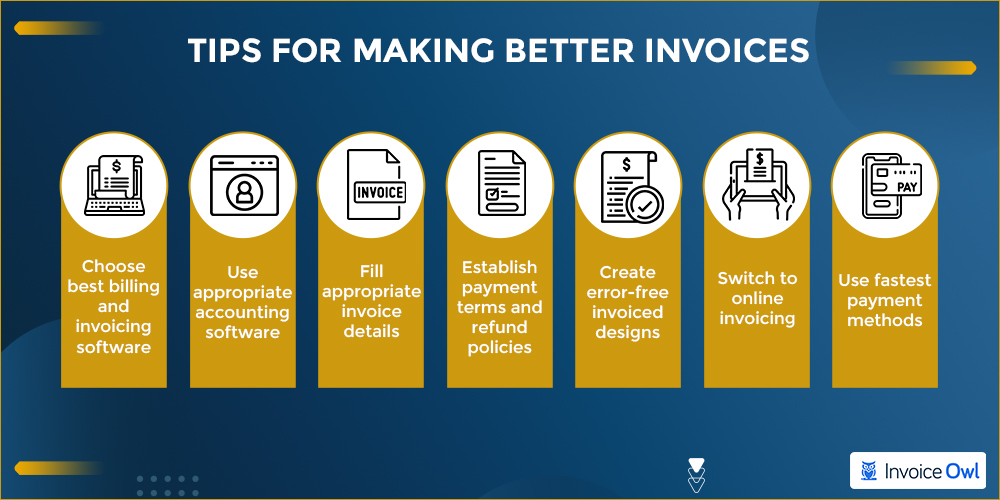
Invoices are meant to request payment. But what if we say that you can make an everlasting impression on customers through your invoices.
Want to learn that magic trick?
Creating professional invoices
Pick an invoicing software that fits your business needs and offers a free trial. This way you can test its features. The right software can simplify billing and streamline payments.
Efficient billing systems
Use appropriate accounting software to keep track of paid and unpaid invoices. This keeps your financial records organized and ensures steady cash flow for your business.
Assign invoice numbers & verify details
Assign appropriate invoice numbers to keep your records organized and verify your clients' contact information and the total amount due to ensure quick and error-free payment processing.
Set payment terms and refund policies
Establish clear payment terms and refund policies for each service to avoid misunderstandings later. Clearly list available payment methods like credit cards, debit cards, or online payments for a smooth transaction process.
Take help for creating professional invoices
If needed, seek external help to craft professional invoices or manage accounting. Assistance with invoicing, business transactions, and debt collection can help you stay focused on core activities.
Digital tools and automation
Switching to online invoicing makes billing faster, more accurate, and easier to manage. The advanced digital tools for invoicing are known for an efficient system to reduce manual work, minimize errors, and accelerate your invoicing process so you get paid on time.
Other than these tips, one thing that helps you streamline the invoicing process is digital signatures.
So, if you want to get paid quicker than ever, let's talk about e-signatures.
Growing Trend of Using Digital Signatures (Adobe Signs) Post Covid
As the pandemic has turned around the way businesses used to function, we saw work from home and virtual meeting cultures growing.
Similarly, another trend that went mainstream is digital signatures.
Especially, the Adobe signs have accelerated e-signatures to the next level. It helps businesses
- go contact-free
- digitalize
- enhance time-efficiency
Speaking of going paperless, InvoiceOwl helps you to create, manage, and send invoices digitally in just a few clicks.
Ready to Streamline Your Invoicing Process?
Join 100,000+ contractors and small businesses using InvoiceOwl to create professional invoices and get paid faster.
Download InvoiceOwl TodayConclusion
Now that you know the key features and elements of invoices, it is easier for you to generate your own invoices for your customers. It is the most important thing that this process will help you to receive payments faster, manage finances, streamline workflow and also reduce any mental pressure regarding customer payments.
We at InvoiceOwl always try to provide you with ideas, trends, tips, advice, and more information on invoicing. Our tips to create free invoices will help you to ace your invoicing game.
So, download the InvoiceOwl app TODAY!
Frequently Asked Questions
The details included in a sales invoice document are invoice date, address, line items, applied taxes, discounts, payment terms, amount, due date, and payment instructions.
Yes, it can be. Once the word invoice is generated and sent to a customer, it is now a bill for the customers to be paid.
First of all, you need to check out the title of the accounting document issued. It would read the word "INVOICE" or "BILL", which will clear your doubt.
An invoice signifies the delivery of goods or compilation of services. Whereas, the billing statement confirms the payment.