For Web:
To cancel your subscription, please follow these steps:
Step 1: Log in to our web app using your credentials.
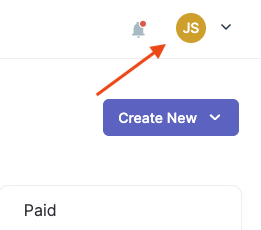
Step 2: Once logged in, locate the user menu at the top-right corner of the screen. It may be represented by your email address or an avatar.
Step 3: Click on the user menu to open a dropdown menu.
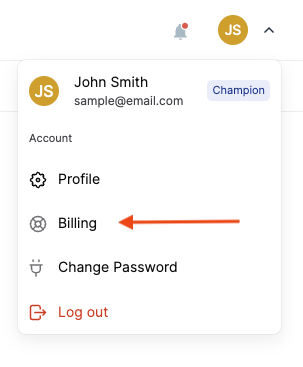
Step 4: From the dropdown menu, select the "Billing" option in your account settings.
Step 5: Click the "Manage" button to open your subscription plan settings:

Step 6: In the billing section, you should find information about your current subscription plan.
Step 7: Look for an option or link to "Cancel Plan" Click on it.

Step 8: A confirmation or verification screen may appear. Read through the information presented carefully.
Step 9: Follow the prompts or instructions provided to proceed with the cancellation process.