
Key Takeaways
- 01Separate business and personal finances by opening a dedicated business bank account
- 02Digitize receipts and documents to free office space and enable easy access from anywhere
- 03Use accounting software to automate expense tracking and generate financial reports
- 04Connect your bank account to accounting software for real-time transaction tracking
- 05Hire a bookkeeper if you need professional help managing complex business finances
A lot of responsibilities come when you're planning or have already started your small business. One such responsibility is tracking and organizing your business expenses. By organizing business expenses properly, you get insight into the profit and loss of your business. Therefore, as a small business owner, it becomes essential to manage the finances of your business and take proper care of recording expenses, tracking, and most importantly analyzing excessive expenses. Moving ahead, let's check how to organize expenses for a small business and stay on top of your small business expenses.
Common Business Expenses
Let's highlight some of the most common business expenses that you need to manage on a daily, monthly, and yearly basis.
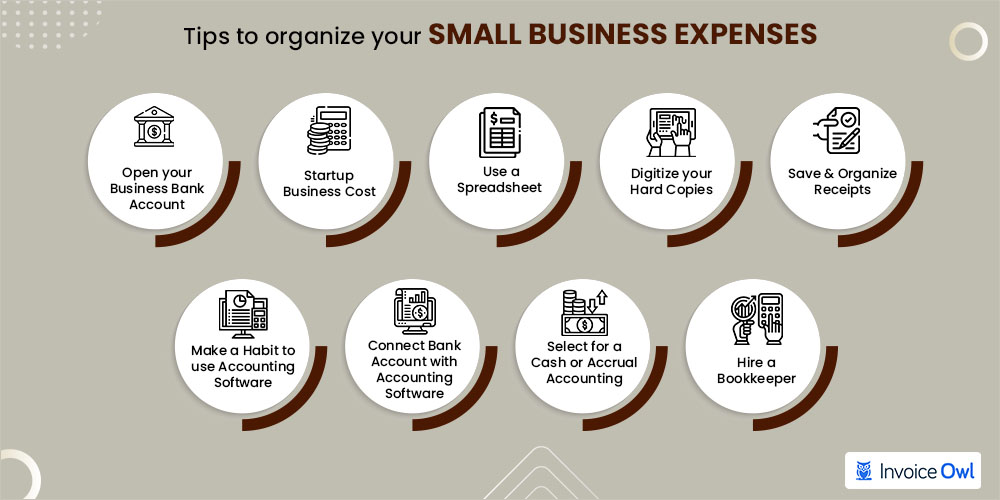
10 Tips To Organize Your Small Business Expenses
Get off to the best possible start on organizing and managing your small business expenses with these 10 exclusive tips.
1. Open Your Business Bank Account
To manage all your business expenses, you must have a business bank account, and you must use it only for your business transactions. Remember that you should not incur personal expenses from a business account and vice-versa. Opening a business bank account is very simple. But, first, you must be ready with your details and business details.
Personal details: Your name, address, birth date, social security number, ownership percentage in your business, and most importantly, your government-issued photo ID.
Business details: Your business name, DBA (Doing Business As), business address, employer identification number (EIN), and entity type.
2. Set Aside Your Startup Business Costs
You'll need huge capital for starting and setting up your new small business. And to organize such costs, you'll have to keep control of your expenditure. The best recommendation is to group them by type. Generally, there are two categories involved in startup business costs: recurring and one-time expenses.
- Recurring expenses: The expenses that are probably going to be paid on a monthly basis, such as rent, utilities, and employee salaries.
- One-time expenses: The expenses that you need to start your business like permits, furniture, equipment, licenses, and fees.
3. Use a Spreadsheet
Using a spreadsheet is a low-tech approach that helps in organizing and tracking business expenses, especially if you have just launched your new business. Once your business grows, you need to adopt a technologically advanced tracking method like accounting software. If you create a spreadsheet from scratch, you need to track every business expense you perform daily manually. You also need to categorize and group your expenses as per your business needs. And whether you use Excel or Google Sheets, both are easy to import into many accounting software.
Excel and Google Sheets files can be easily imported into most accounting software, making it simple to transition as your business grows.
4. Digitize Your Hard Copies
Dealing with a lot of paper is a very tedious task. Thus, digitizing is the best way to organize:
- Paper invoices and estimates
- Bank records
- Tax papers
- Contracts, including leases and purchase agreements
- Trademark applications and patents
- Permits and business licenses
- Employee records
Digitizing these documents allows you to access them wherever you want. Other than that, it frees your office space and makes it easy to retrieve any document in a few clicks. It's also important that you don't store all your digital backups on your main computer as it increases the chances of losing your files. A better option would be to store your files on the cloud.
Don't store all your digital backups on your main computer as it increases the chances of losing your files. A better option would be to store your files on the cloud.
5. Save and Organize Records in Different Locations
The next essential tip that you can follow when managing your business is organizing your records and receipts into categories.
Google Drive
It is a cloud-based storage platform where you can keep all your records or business receipts. It supports Google Document, Google Sheet, Google Presentation, and many other tools that bring convenience to creating and sharing information.
Use Folders
Create folders as per your business requirements. You can even create sub-folders for business expense categories and name them appropriately, making it easy for you to find them whenever you need them.
Use Evernote
It's an app so that you can access your information whenever and wherever you need it. You can create notes related to receipts and store them in digitized format.
Use WellyBox
It's a web-based app that quickly collects all your essential information and helps you generate an expense report.
6. Make a Habit To Use Accounting Software
Using a spreadsheet to manage your business finances at the early stages is a good option. But as your business grows, it becomes challenging for you to deal with manually entering transactions. Accounting software easily records and categorizes financial transactions, manages bill payments, sends customer invoices, manages payroll, and creates standard business reports. Here's how accounting software makes it easier and faster to manage your business expenses.
- It saves your hours of work by managing manual bookkeeping and accounting processes through accounting tips.
- It automatically generates your daily, weekly, monthly, and even yearly reports.
- All your financial data is in synchronization via cloud technology.
- It creates professional-looking financial statements.
Using a reliable accounting solution takes the stress out of managing invoices, bills, and recurring payments while ensuring you have an overview of your company's financial health.
7. Connect Your Bank Account With Accounting Software to Import Transactions
Generally, it's possible to integrate your business bank account with your accounting solution, but that entirely depends on the accounting software solution you opt for. In some cases, you might need to download the credit card and bank statement for your business and manually import them as CSV (Excel) files into the system. Many accounting software offers a connectivity plug-in that acts as a digital link between the bank account and accounting software. This allows you to get real-time bank transactions daily and download bank statements on the go. In addition, some accounting software offers direct integration to the bank, so business owners can manage and complete all banking in the accounting system without logging into the bank account portal.
Manual Import: Download credit card and bank statements as CSV files and import them into your accounting software.
Plug-in Connectivity: Use a digital link between your bank account and accounting software for real-time transaction updates.
Direct Integration: Some accounting software offers seamless bank integration, allowing you to manage all banking within the accounting system.
8. Select For a Cash or Accrual Accounting
To develop a consistent accounting method for managing business finances, small business owners need to define a set of rules for analyzing and reporting income and expenses.
Who can use accrual accounting or cash-based accounting? Generally, small businesses with $25 million or less in annual gross receipts for the three prior tax years.
Cash vs Accrual Accounting Comparison
| Aspect | Cash Basis Accounting | Accrual Basis Accounting |
|---|---|---|
| When transactions are recorded | When payment is received or made | When the transaction occurs, regardless of payment |
| Complexity | Straightforward and easier to manage | Requires double-entry bookkeeping |
| Best for | Small businesses with simple finances | Businesses needing accurate long-term financial view |
| Financial picture | Short-term snapshot | More accurate and complete financial picture |
| Tax deduction timing | Deducted in the tax year they are paid | Deducted in the tax year they were incurred |
| GAAP compliance | Not GAAP compliant | Recognized under generally accepted accounting principles (GAAP) |
Accrual accounting is one of the recognized accounting methods under generally accepted accounting principles (GAAP). And even most private companies with some limited exceptions use this approach for financial reporting. Cash basis accounting is a straightforward approach and easier to manage for small businesses. It simply records the transaction once the payment is received. Expenses are deducted in the tax year they are paid. On the other hand, accrual basis accounting records the transaction on completion of service or the sale. Thus, it allows businesses to deduct it in the tax year it was incurred, regardless of when the payment is made. Accrual accounting requires double-entry bookkeeping and paints a more accurate and complete financial picture because it takes a long-term view of the business.
9. Hire a Bookkeeper
Many times, you might find it challenging to use accounting software. In that case, it's better to hire an expert professional who can quickly deal with the business accounting purpose. A bookkeeper will take care of almost every business expense and help you stay on top of expense tracking. Moreover, they'll offer you essential advice when you are stuck using accounting software, helping you improve your financial situation, and making you ready to deal with issues and opportunities.
Moreover, a bookkeeper will help you provide regular weekly and monthly reports that help you find trends and address them accordingly. It's not mandatory that you hire a full-time bookkeeper; you can also include a freelancer or a service that lets you pay by the hour for bookkeeping services.
You don't need to hire a full-time bookkeeper. Consider freelancers or hourly bookkeeping services to get professional help within your budget.
10. Secure Your Business
Just knowing how to organize a business is not enough. You need to know how to secure your business too.
Protecting the business must be of prime importance for any business owner. It may be by having business insurance or setting up an LLC or an S-Corp. Having an LLC or S-Corp can easily separate your business identity and finances from personal finances. In addition, if you undergo any legal issues, then personal property and assets will not be liable at all. It's better to renew any essential certifications or licenses you need to remain compliant with by adding them to your calendar. Protecting your business is the most efficient way to avoid any financial issues.
So these were the top 10 tips on how to organize business expenses as a small business owner.
If you still have doubts, you can clarify those in the below answered frequently asked questions.
Simplify Your Business Expense Management Today
InvoiceOwl makes expense tracking, invoicing, and financial management effortless. Join over 145,000 businesses who trust InvoiceOwl to streamline their finances.
Start Your FREE TrialFrequently Asked Questions
Bookkeeping is the process of recording and organizing a business's financial transactions, and a bookkeeper is a person responsible for that process. With proper bookkeeping, business owners can easily determine whether their business is profitable and identify areas for profit expansion.
You can categorize business spending by creating the following categories:
- Create a category for advertising
- List vehicle expenses
- Make a section for commissions and fees
- Designate a category for depletion
- Make a section for depreciation
- List pension and profit-sharing plan expenses
The best accounting software is one that helps you track accounts receivable and accounts payable, gives you a clear overview of your business profitability, and helps you deal with taxation. Some of the best accounting software options include:
- Quickbooks
- Xero
- Freshbooks
- Wave
Related Resources

14 Actionable Accounting Tips for Small Business Owners
New to finance? Discover 14 simple small business accounting tips to track revenues, expenses, and costs, and grow your business effectively.
Read more
6 Best Construction Estimating Software Contractors Should Try
Associated with the construction industry for a while? Explore 6 most popular estimator software to reduce your business paperwork. Follow the given steps to make construction estimates using automated accounting software.
Read more
How to Calculate Cash Flow for Better Financial Management?
Understanding cash flow is crucial for financial success. This guide will show you how to calculate cash flow, formulas, and manage your business's expenses.
Read more
Accounting For Small Businesses 101: How to do Accounting for a Small Business?
A complete guide on how to do accounting for a small business efficiently without hiring an accountant.
Read more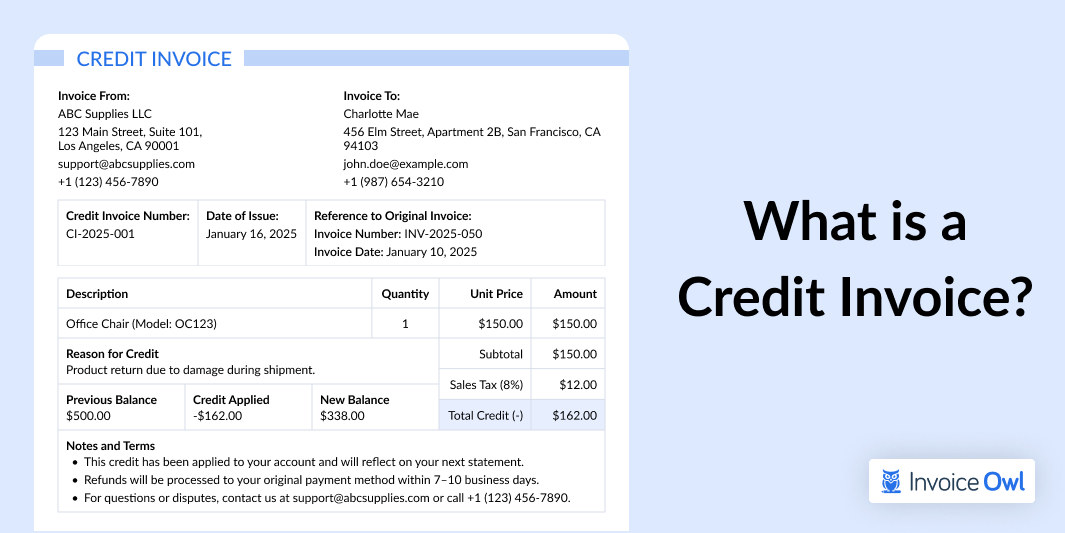
What is a Credit Invoice and How to Use It for Business?
Learn how a credit invoice works to fix billing errors, refund payments, or adjust accounts accurately. Improve your accounting process with expert guidance.
Read more
A Comprehensive Guide to Invoice Tracking
Discover the benefits of seamless invoice tracking with InvoiceOwl. Start a free trial today and streamline your business finances.
Read morePlumbing Estimate
InvoiceOwl's top plumbing estimate and invoicing software. Send custom estimates, invoices, track expenses, and credit memos. Try a free 14-day trial.
Read moreReporting
Get business performance insights with InvoiceOwl sales reporting software. View your monthly, quarterly, annual income, outstanding payments, and taxes owed.
Read more14 Actionable Accounting Tips for Small Business Owners
New to finance? Discover 14 simple small business accounting tips to track revenues, expenses, and costs, and grow your business effectively.
Read more6 Best Construction Estimating Software Contractors Should Try
Associated with the construction industry for a while? Explore 6 most popular estimator software to reduce your business paperwork. Follow the given steps to make construction estimates using automated accounting software.
Read moreHow to Calculate Cash Flow for Better Financial Management?
Understanding cash flow is crucial for financial success. This guide will show you how to calculate cash flow, formulas, and manage your business's expenses.
Read moreAccounting For Small Businesses 101: How to do Accounting for a Small Business?
A complete guide on how to do accounting for a small business efficiently without hiring an accountant.
Read moreWhat is a Credit Invoice and How to Use It for Business?
Learn how a credit invoice works to fix billing errors, refund payments, or adjust accounts accurately. Improve your accounting process with expert guidance.
Read moreA Comprehensive Guide to Invoice Tracking
Discover the benefits of seamless invoice tracking with InvoiceOwl. Start a free trial today and streamline your business finances.
Read morePlumbing Estimate
InvoiceOwl's top plumbing estimate and invoicing software. Send custom estimates, invoices, track expenses, and credit memos. Try a free 14-day trial.
Read moreReporting
Get business performance insights with InvoiceOwl sales reporting software. View your monthly, quarterly, annual income, outstanding payments, and taxes owed.
Read more14 Actionable Accounting Tips for Small Business Owners
New to finance? Discover 14 simple small business accounting tips to track revenues, expenses, and costs, and grow your business effectively.
Read more6 Best Construction Estimating Software Contractors Should Try
Associated with the construction industry for a while? Explore 6 most popular estimator software to reduce your business paperwork. Follow the given steps to make construction estimates using automated accounting software.
Read moreHow to Calculate Cash Flow for Better Financial Management?
Understanding cash flow is crucial for financial success. This guide will show you how to calculate cash flow, formulas, and manage your business's expenses.
Read moreAccounting For Small Businesses 101: How to do Accounting for a Small Business?
A complete guide on how to do accounting for a small business efficiently without hiring an accountant.
Read moreWhat is a Credit Invoice and How to Use It for Business?
Learn how a credit invoice works to fix billing errors, refund payments, or adjust accounts accurately. Improve your accounting process with expert guidance.
Read moreA Comprehensive Guide to Invoice Tracking
Discover the benefits of seamless invoice tracking with InvoiceOwl. Start a free trial today and streamline your business finances.
Read morePlumbing Estimate
InvoiceOwl's top plumbing estimate and invoicing software. Send custom estimates, invoices, track expenses, and credit memos. Try a free 14-day trial.
Read moreReporting
Get business performance insights with InvoiceOwl sales reporting software. View your monthly, quarterly, annual income, outstanding payments, and taxes owed.
Read more