QuickBooks is one of the most popular and leading accounting and invoicing tools. However, it may still have certain qualities that don't make it an ideal option for your business.
Maybe the pricing is too high, or the features are too many. You might have never used the tool and found its interface complicated. That's when you realize it's time to switch to another invoice tool altogether.
The right invoicing tool can work wonders for your business. However, choosing an alternative can be exhausting, considering the plethora of options available.
In the following article, we review a list of QuickBooks alternatives based on their features and pricing. This will help you find a tailored solution for your business.
What You'll Learn
- 01Top reasons businesses seek alternatives to QuickBooks
- 02Detailed comparison of 10 leading invoicing platforms
- 03Pricing breakdown and feature analysis for each alternative
- 04Key factors to consider when choosing invoicing software
- 05How to find the best fit for your business needs and budget
Why Consider a QuickBooks Alternative?
Here are the most common reasons users seek alternatives to QuickBooks:
- High costs: QuickBooks features may not be budget-friendly for many small businesses or solo entrepreneurs in the US. If you want to save business expenses without sacrificing key functions, you need an alternative.
- Need limited features: As an independent business owner, you may not need an abundance of features that QuickBooks provides. Finding an alternative that provides just the features you need may be ideal.
- Steep learning curve: You may need an alternative accounting software where you can get started straight away without spending too much time learning the platform.
- Integrations: Other tools than QuickBooks provide better integration to your existing systems and even offer flexibility in managing business processes.
- User restrictions: A lot of users switch to QuickBooks alternative simply because QuickBooks offers limited users per plan and adding more users increases the costs.
How do we analyze and select alternatives to QuickBooks?
We decided on the QuickBooks alternatives after assessing over 25 different solutions in accounting and invoicing and narrowed down our findings to the best 10 tools.
We evaluated these 10 best tools to get firsthand experience of their functionalities and even gathered a detailed understanding of their user reviews from listing platforms like G2, Software Advance, SourceForge, etc.
This allowed us to get into the details of how users are experiencing these tools and why they're a preferable alternative to QuickBooks.
We checked these 10 tools based on their ease of use, features, pricing models, overall performance, and compliance with accounting standards like International Financial Reporting Standards (IFRS). The comprehensive assessment can help users make an informed decision to pick an alternative.
Quick Comparison
At-a-Glance Comparison
| # | Software | Price | Rating | Best For |
|---|---|---|---|---|
| 1 | InvoiceOwl | $9.99/mo | 4.5 | Small businesses & contractors |
| 2 | Xero | $15/mo | 4.2 | Managing finances & accounts |
| 3 | FreshBooks | $7.60/mo | 4.1 | User-friendly invoicing |
| 4 | Zoho Books | $15/mo | 4.3 | Scalable Zoho ecosystem |
| 5 | Sage 50 | $60.08/mo | 4.0 | Finance & inventory management |
| 6 | Square Invoices | Free | 4.1 | Simple accounting needs |
| 7 | Invoice Ninja | Free | 4.2 | International clients |
| 8 | Wave Invoicing | Free | 4.0 | Budget-conscious businesses |
| 9 | Stripe Billing | Custom | 4.4 | Recurring revenue models |
| 10 | Paymo | $5.9/mo | 4.1 | Project management + invoicing |
Jump to Software
InvoiceOwl
InvoiceOwl
Best for overall invoicing processing and estimating for small businesses

InvoiceOwl is an invoice processing and estimating tool that provides invoice processing automation for small businesses across plumbing, contractors, carpentry, and HVAC.
Primarily, InvoiceOwl helps businesses to reduce accounting-related paperwork, streamline invoice and estimate generation, and receive timely payments.
InvoiceOwl offers an easy-to-use and simplistic design where solopreneurs can estimate while on the go. The features of the tool help businesses improve cash flows, comply with tax regulations, and digitize account receivables for businesses that rely on paper-based invoices.
Advanced features of InvoiceOwl
- Invoice generation: Allows businesses to generate invoices and customize their invoice with information, such as billing name, branded logo, photo attachments, and payment instructions.
- Estimates generation: Facilitates you to generate accurate estimates and even leverage templates to send quick quotations and get paid faster.
- eSignature: Provides users with a digital drawing pad for eSignatures that lets them sign off the documents and approve payments.
- Reporting: Offers a comprehensive view of your business transactions and invoices under an invoice reporting dashboard that helps you make informed decisions, track your business performance, and improve basic financial reporting.
I can create estimates on-the-go and convert them to invoices easily. The interface is intuitive and saves me so much time compared to QuickBooks.
Xero
Xero
Best for managing finances & accounts
Xero is a reliable accounting software that offers several toolkits to manage finances with precision. The tool provides various services like accounting, invoicing, expense tracking, payroll, and bank reconciliation.
The tool is ideal for small and medium-sized businesses as it offers a user-friendly interface to simplify complex accounting tasks.
Xero makes it accessible for business owners without a strong financial background. The platform also facilitates key features, such as multi-currency transactions, detailed financial reporting, and integration with other third-party apps.
- Global-friendly with multi-currency support
- Automated currency conversions
- Project-based cost tracking
- Comprehensive financial reporting
- Large ecosystem of integrations
- Higher price point than simple invoicing tools
- More features than needed for invoicing-only businesses
- Requires some accounting knowledge
Xero's multi-currency support has been a game-changer for our international business. The reporting features help us track profitability across projects.
FreshBooks
FreshBooks
Best for user-friendly invoice generation

FreshBooks is one of the most popular names for small business accounting.
With FreshBooks, companies and self-employed individuals can easily organize their finances, eliminate the time and effort they spend on preparing data for accounting, and save time on mundane entries.
Some of these important tasks include invoice processing and payment reminders through emails in addition to customizable through integration with third-party applications.
- Clean, intuitive interface
- Built-in time tracking
- Automatic tax calculations
- Good customer support
- Easy to get started quickly
- Client limits on lower tiers
- Auto-save functionality missing in some areas
- Setup can feel complex initially
Helps me stay organized with time tracking across different clients and send invoices from the same place. Much easier to use than QuickBooks.
Zoho Books
Zoho Books
Best for scalable invoice automation for Zoho users

Zoho Books is a cloud-based accounting tool. It is a top choice for business owners to manage their finances, automate business workflows, and collaborate across departments.
One best thing about Zoho Books is it integrates seamlessly with other Zoho products and third-party applications. This makes it a flexible choice for businesses looking to scale and those that are already using Zoho for other business functions.
- Mobile accessibility via app
- Seamless integration with Zoho ecosystem
- Dedicated client portal
- Automated workflows
- Good value for money
- Can be overwhelming with too many features
- Learning curve for advanced features
- Limited customization in some areas
The mobile app makes it easy to manage invoices from anywhere. The Zoho ecosystem integration is a huge plus for our business.
Sage 50
Sage 50
Best for managing business finances and inventory
Sage 50 is an accounting solution that caters to small and medium-sized businesses. It primarily offers end-to-end solutions for financial management.
The platform allows users to manage their accounts payable and receivable, cash flow statements, and budgets. The platform also enables businesses to comply with tax regulations to make it easier for them to handle taxes and reporting.
- Unlimited users at no extra cost
- Comprehensive inventory management
- Strong budgeting and forecasting tools
- Tax compliance features
- Multi-location stock tracking
- Higher price point
- Desktop-based (less cloud flexibility)
- Steeper learning curve
- May be overkill for simple invoicing needs
Sage 50's inventory management is excellent. The unlimited users feature is a big advantage over QuickBooks for our growing team.
Square Invoices
Square Invoices
Best for simple accounting needs like invoices and bank reconciliations

Square Invoice is a digital invoicing solution that allows businesses to create, customize, and send professional invoices at a quick rate.
Square Invoice primarily caters to industries, such as restaurants, banking, retail, & professional services.
The best part of Square Invoice is that it seamlessly integrates with Square's payment processing system, which already has numerous users. It enables users to pay e-invoices through various methods, such as credit cards, ACH transfers, and digital wallets.
- No monthly subscription required
- Professional templates out of the box
- Two-factor authentication for security
- Works across all devices
- Integrated with Square ecosystem
- Limited customization options
- Payment collection restricted by country
- Email deliverability issues reported by some users
- Processing fees can add up
Clean dashboard that's easy to use. The reminder feature for invoices is helpful. Free plan is perfect for my small business.
Invoice Ninja
Invoice Ninja
Best for invoice processing for international clients
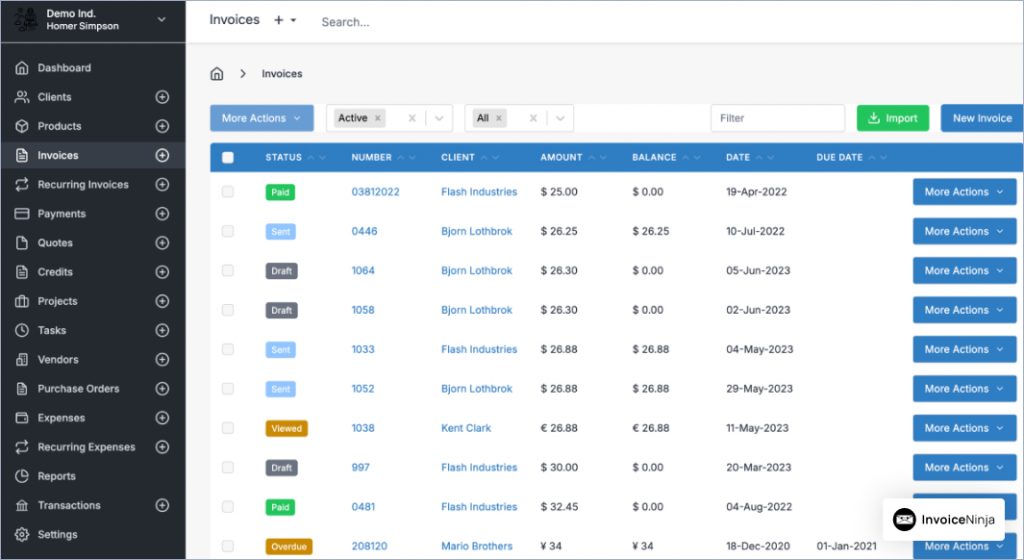
Invoice Ninja is an invoicing and billing platform that offers a full suite of tools for creating and managing invoices, tracking expenses, and handling payments.
Businesses can even automate their payment reminders, and leverage multiple currencies and payment gateways. It is an ideal tool for companies that deal with various international clients and need flexible choices in terms of budgets and features.
- Cost-effective pricing
- Flexible customization options
- Multiple payment gateways supported
- Open-source option available
- Strong international support
- Interface could be more modern
- Limited reporting in free tier
- Fewer integrations than competitors
Invoice Ninja's multi-currency support and flexibility make it perfect for our international client base. Very cost-effective alternative to QuickBooks.
Wave Invoicing
Wave Invoicing
Best for invoicing processing for entrepreneurs on a budget
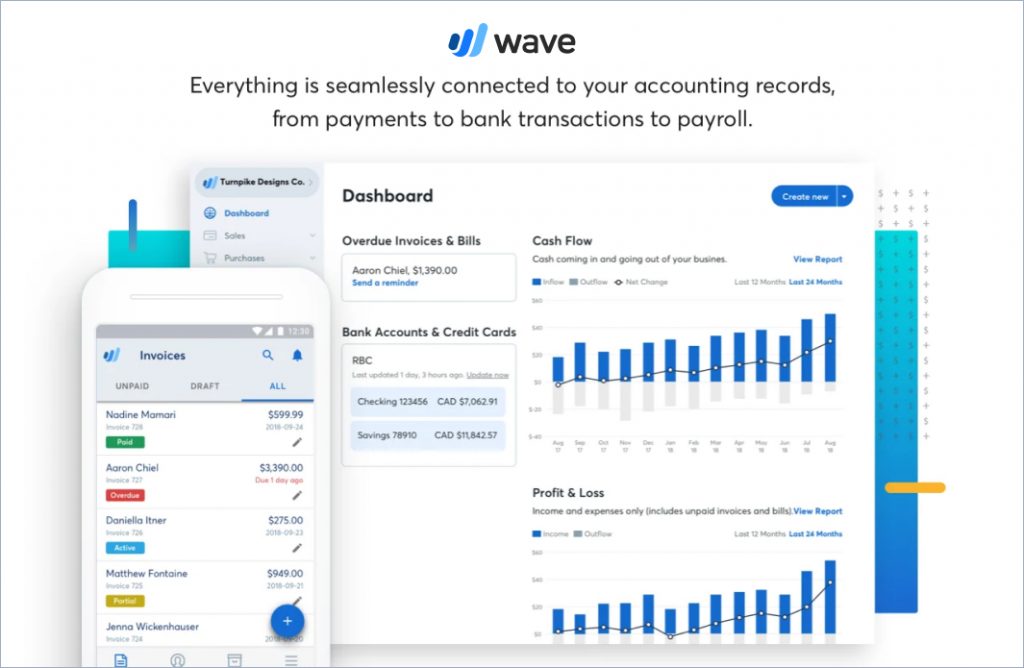
Wave Invoicing is a part of the Wave financial tool that offers numerous accounting and financial management functions.
Wave Invoicing allows businesses to create and send unlimited professional invoices while offering numerous pre-designed invoice templates for customization.
It also includes features, such as automatic payment reminders, recurring billing, and the ability to accept online payments through credit cards and bank transfers.
Wave Invoicing is a comprehensive solution for managing business finances in one place. It offers a user-friendly interface and integration with other Wave products, such as accounting and receipt scanning.
- Completely free for basic invoicing
- Unlimited invoices on free plan
- Integration with Wave accounting
- Automatic payment reminders
- Simple, clean interface
- Limited advanced features on free plan
- Processing fees for payments
- Customer support limited for free users
- Fewer integrations than paid alternatives
Easy to use on mobile devices. Shows all invoices clearly with paid/outstanding status. Can't beat the free price for basic invoicing needs.
Stripe Billing
Stripe Billing
Best for small businesses with recurring revenue
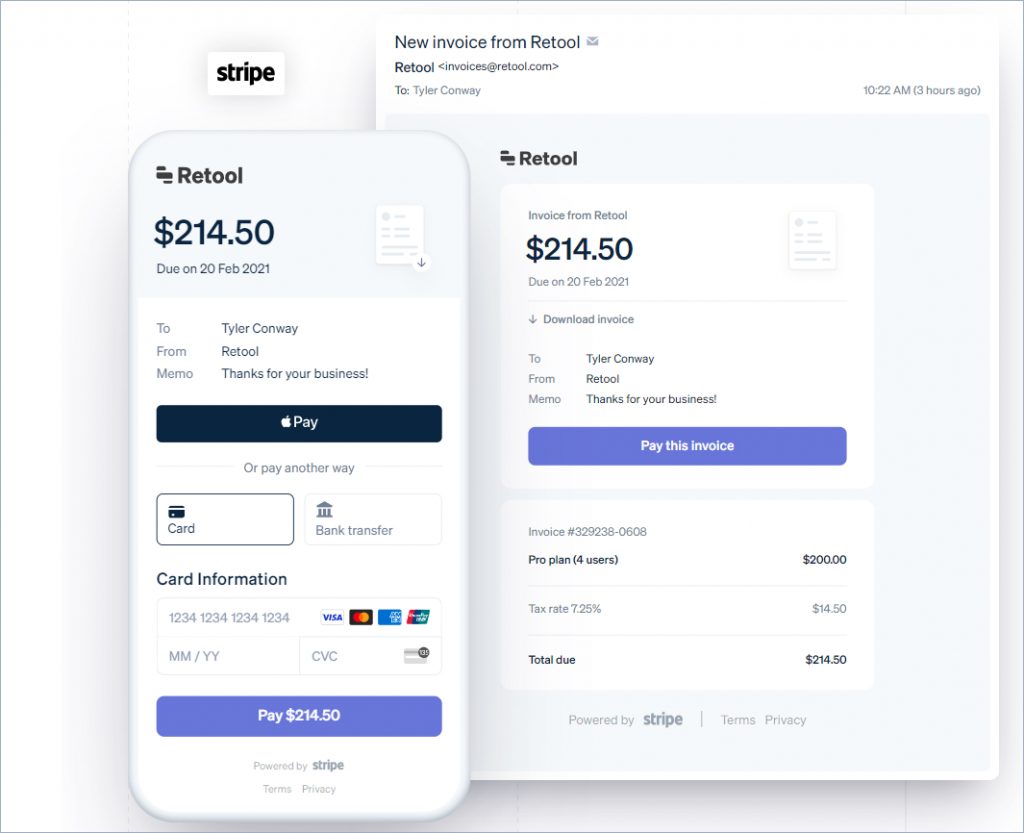
Stripe Billing is a subscription management platform meant for businesses to manage their complex billing cycles.
The software allows businesses to automate invoicing, manage subscriptions, and accept payments in multiple currencies.
Stripe Billing integrates seamlessly with the broader Stripe ecosystem, offering advanced features like smart invoicing, customized payment terms, and API invoicing. With numerous API options, it's highly flexible and scalable, making it suitable for businesses of all sizes.
- Specialized recurring billing features
- Highly scalable payment processing
- Flexible API for custom billing logic
- Smart retry logic for failed payments
- Excellent for subscription businesses
- Requires technical knowledge for setup
- Custom pricing can be expensive
- Overkill for simple invoicing needs
- Steep learning curve for non-technical users
Stripe Billing handles our complex subscription model perfectly. The automated retry logic has significantly reduced our churn from failed payments.
Paymo
Paymo
Best for overall project management for small businesses
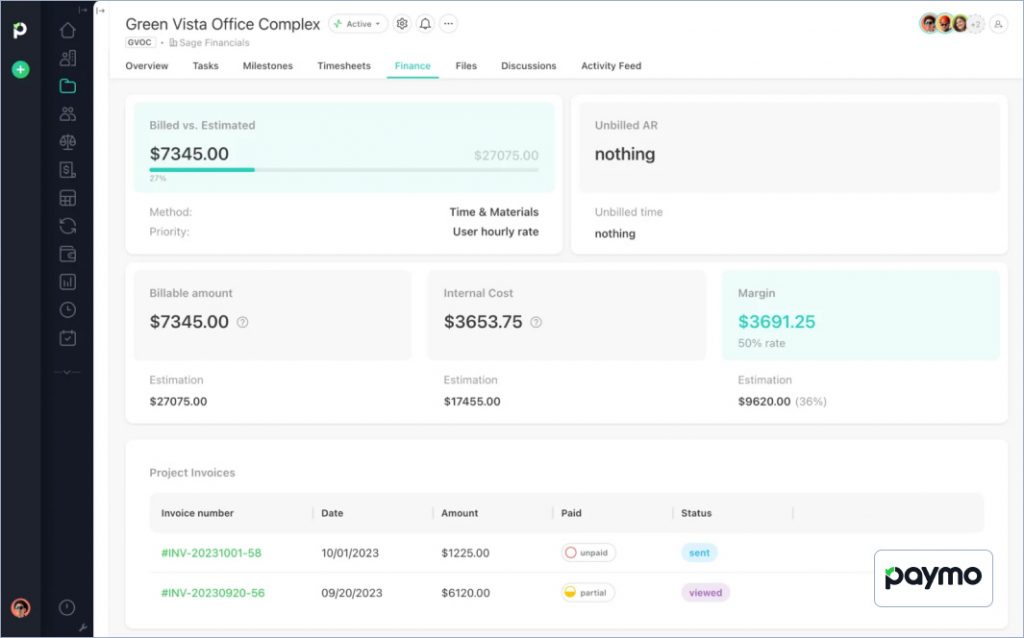
Paymo is a project management platform that caters to small businesses, freelancers, and agencies.
Paymo offers an integrated solution that offers time-tracking, invoicing, and project management tools under a single platform. This helps teams manage entire workflows from start to finish.
The platform allows users to create invoices directly from timesheets and track payments. Additionally, Paymo provides reporting tools that give insights into project progress, team performance, and financial health. This helps businesses stay organized and on top of their work.
- Invoicing integrated with project management
- Time tracking to invoice workflow
- Task management and team scheduling
- Invoice generation from timesheets
- All-in-one platform
- Per-user pricing can get expensive
- More complex than invoicing-only tools
- Learning curve for all features
- May be too much for simple invoicing needs
The time tracking to invoice workflow is seamless. Having project management and invoicing in one place saves us so much time.
Factors to Consider When Choosing an Invoicing Tools
Ready to Simplify Your Invoicing?
Join thousands of small businesses using InvoiceOwl to streamline invoice processing and get paid faster.
Try Free for 3 Days1. Cost vs. features
The most important consideration you need to have is to weigh the costs of the tool against the features it provides. Before you choose a new accounting software and invoicing solution, look for a solution that provides the functionalities you need without charging you for extras you won't use. Consider whether the pricing is scalable as your business grows.
2. Ease of use
A simpler tool with accounting features can streamline your operations, and make it easy to onboard your team and train them to use the tool. The software should be intuitive, with a clean interface that makes it easy to perform tasks without getting bogged down in complicated menus or settings.
3. Integration with other tools
Your accounting software needs to play well with the other tools you're already using, like CRM systems, payroll services, or e-commerce platforms. In addition, limited integration options with popular US apps and tools like Stripe, Square, or PayPal may lead businesses to seek alternative solutions with more comprehensive integration capabilities.
4. Customer support
Reliable customer support can make a big difference, especially if you run into issues while getting used to a new system. Look for a provider that offers quick support options, whether that's through live chat, phone support, or a detailed knowledge base. Businesses often seek solutions and doubts regarding bill payment and advanced invoicing features with 24/7 support or US-based support teams.
5. Data storage & scalability
With regulations like the General Data Protection Regulation (GDPR) and the California Consumer Privacy Act (CCPA) in place, many U.S. businesses are becoming increasingly concerned about data storage and security. This has them looking for alternative solutions that offer stronger data protection, such as customers' sensitive information, and maintain compliance.
6. Customization & scalability
Your business is unique, so your accounting software should be able to adapt to your specific needs. Look for a solution that allows customization, whether generating specific reports or customizing the dashboard. Furthermore, tax compliance is critical, so ensure the software supports varied sales tax regimes and uses tax calculations for seamless filing and payment.
Test multiple alternatives using their free trials before committing. Pay attention to how the software handles your most common tasks—creating invoices, tracking payments, and following up on overdue accounts.
Make Invoice Processing Easier and Hassle-free with InvoiceOwl
Choosing the right invoicing software is an important step in managing your business effectively. Exploring alternatives to QuickBooks Online can open up new possibilities that align better with your needs and budget.
Remember, the best invoicing and accounting software is the one that fits seamlessly into your workflow and helps you achieve your goals without unnecessary complications. Take the time to find the perfect match, and you'll be well on your way to a smoother, more efficient business operation.
InvoiceOwl is a great tool to consider as it fits seamlessly into your workflow and helps you achieve your business goals without unnecessary complications. It allows users to make estimates and invoices in seconds and facilitates a 100% paperless workflow. Try the tool for free to learn how InvoiceOwl can automate your invoice processing.
Frequently Asked Questions
Scalability is important if you anticipate business growth. Alternatives like InvoiceOwl and Zoho Books offer flexible plans that can scale with your business, ensuring that the software grows alongside your customer support needs.
Yes, platforms like InvoiceOwl allow extensive customization options. You can tailor the interface, chat widgets, and email templates to align with your brand's unique identity and visual aesthetic.
Many platforms offer free trials or demo versions that allow you to explore the features and usability before making a commitment. This helps businesses ensure the software meets their expectations.
Most alternatives offer tax preparation features, including automatic tax calculations, tax report generation, and integrations with tax filing services. Tools such as Sage and Xero help simplify tax season and ensure compliance.
Yes, migrating from QuickBooks to InvoiceOwl is a seamless process. Businesses can easily import their data, such as clients, invoices, and payment history into InvoiceOwl. The support team is available to assist you every step of the way, making it easy to switch from QuickBooks to InvoiceOwl and get started with our intuitive invoicing platform.
Yes, InvoiceOwl is a cost-effective alternative to Quickbook and ideal for small business owners who want limited features and pay for just what they need. InvoiceOwl also offers a free trial for 3 days, during which users can check the tool before subscribing.